Xamarin Cross-Platform Solution Creating the Views Directory (AboutPage)

Xamarin Cross-Platform Solution Creating the Views Directory (AboutPage)

C#, Programming, Xamarin Forms
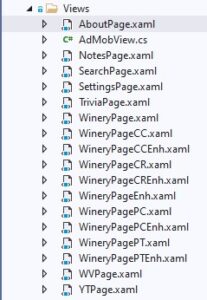
Now we get to create the individual Views used in our Xamarin cross-platform mobile app. Because many of these are quite similar, we will be excluding much of the code in XAML page documents below the first. As I am sure you already know, proper app design means separation of the Model-View-Controller into their own sections of code. Today we will be covering the View designs of our Wet Your Whistle mobile app. We will start below with the xaml contained in the About page. <?xml version="1.0" encoding="utf-8" ?> <ContentPage xmlns="http://xamarin.com/schemas/2014/forms" xmlns:x="http://schemas.microsoft.com/winfx/2009/xaml" xmlns:local="clr-namespace:NYWineryHopper.Views" xmlns:controls="clr-namespace:MarcTron.Plugin.Controls;assembly=Plugin.MtAdmob" x:Class="NYWineryHopper.Views.AboutPage" Title="About"> <ContentPage.ToolbarItems > <ToolbarItem Text="Vid Walkthru" Clicked="Loadvid" /> <ToolbarItem Text="Settings" Clicked="LoadSettings" /> </ContentPage.ToolbarItems> <ContentPage.Content> <Grid> <Grid.RowDefinitions> <RowDefinition Height="*" /> <RowDefinition Height="50" /> </Grid.RowDefinitions> <StackLayout Grid.Row="0"> <Label Text="About NY Wine Hopper" FontSize="Large" VerticalOptions="CenterAndExpand" HorizontalOptions="CenterAndExpand" /> <Image…
Read More
Xamarin Cross-Platform Solution Creating the Data Directory

Xamarin Cross-Platform Solution Creating the Data Directory

C#, Programming, Xamarin Forms
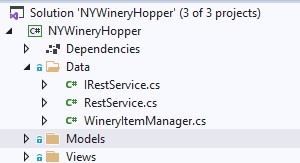
Now we will be able to make the connection between the MySQL database designed previously and the individual models. This connection is enabled using the interface, service and Item Manager files shown at the left. Let's begin by explaining the interface and service together. public interface IRestService { Task<List<WineryItem>> ReadWineries(string typ, string val, int wrs, int distanceFrom); Task<List<string>> GetLTDNames(); Task<List<string>> GetCounties(); Task<string> GetName(int id); Task<double> GetLat(int id); Task<double> GetLong(int id); } As with the other interface we have seen, this class file defines the individual procedures declared inside of RestService. After the task declaration we define what will be returned by the individual process (List of WineryItem, list of strings, string, double). Inside the parentheses of each procedure you will notice the type and name of parameters being fed into…
Read More
Xamarin Cross-Platform Solution Creating the Models Directory

Xamarin Cross-Platform Solution Creating the Models Directory

C#, Programming, Xamarin Forms
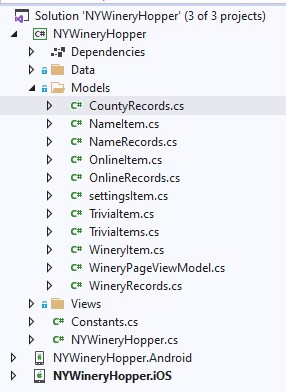
We will begin with our Models directory. This is not necessarily created by the template chosen in the beginning, so you may need to right-click on the Portable Class Library (PCL) project and Add-New Folder. As you can see, most of these are created as pairs with Item and Records files. As we discover the C# code behind each of these classes, the reason for this design will become quite obvious As shown above, each of these files is a cs class file. These are created with a right-click on the Models directory, Add – Class. CountyRecords.cs, one of the single-file classes, contains the code shown below. using System.Collections.Generic; namespace NYWineryHopper.Models { public class CountyRecords { public List<string> records { get; set; } } } Why is this a “single-file”…
Read More
Creating the Visual Studio 2019 Xamarin Solution

Creating the Visual Studio 2019 Xamarin Solution

C#, Featured, Programming, Xamarin Forms
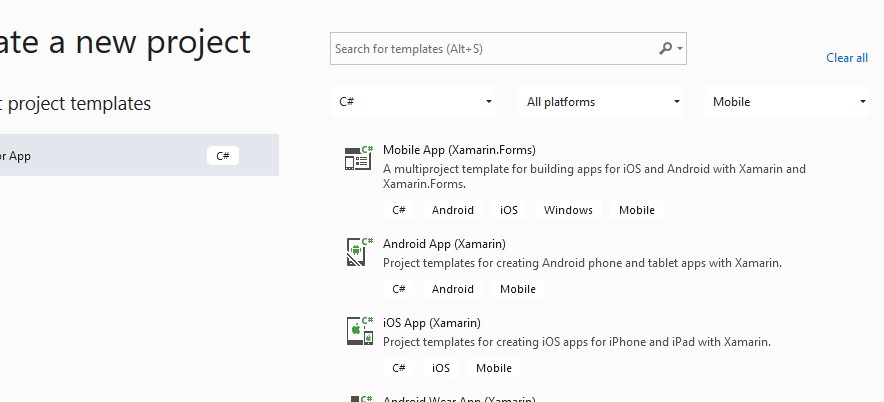
We have a single Xamarin solution with a main project along with an individual project for each of the platforms being targeted. In this case, we are looking at the individual app designed for New York, called NYWineryHopper. We also see the Android and iOS projects. If desired, we could have included a UWP (Universal Windows) project in order to target windows with our mobile app. We will start by creating a blank Xamarin Forms project. After opening Visual Studio 2019 (version 16.9.2), click on File-New-Project. Since our development will be using the C# language, that is selected in the first dropdown available and Mobile is chosen on the right-side dropdown. We happen to have the desired selection right at the top. Click Mobile App (Xamarin.Forms) and Next to proceed.…
Read More
Web Site Design: Nobody Should Start with a Blank Page

Web Site Design: Nobody Should Start with a Blank Page

Programming, Promotional, Web Design
Have you designed your own web site in the past few years? Maybe ten years in the past? I sure have. I have used straight HTML, CSS, and even JQuery. My most recent web site designs did not require any of those although they utilized those technologies and many more. You may be thinking "So how should I begin?" You should start with a Content Management System or publishing platform. The CMS platforms available may depend on your individual web host. I recently switched web hosting to a reseller plan on A2 and I have been quite satisfied. Currently I have two functions on my site which spreads the word on my own business - Link Em Up custom business services. I am also using my web site for blogging…
Read More
Cross Platform Programming With Visual Studio 2015 and Xamarin

Cross Platform Programming With Visual Studio 2015 and Xamarin

Featured, Programming
Make your impression in the app development world Have you been tempted to get into cross platform programming with Visual Studio 2015? You can do so with very little software investment. Does this mean that you will need to make a significant investment in hardware? That answer gets a Yes and No. If you are a Windows user, and you probably are if your desired dev platform is Visual Studio, you will need a device with iOS installed. Of course, as a Windows user, you can develop for Windows Phone and Android with no additional hardware or software cost. Required Software Let's take a look at my desired development software and the hardware that has been chosen. I use Visual Studio 2015 Community Edition with Xamarin installed. Xamarin is now…
Read More