Building Your PHP Rest Service-Database Design

Building Your PHP Rest Service-Database Design

PHP, REST
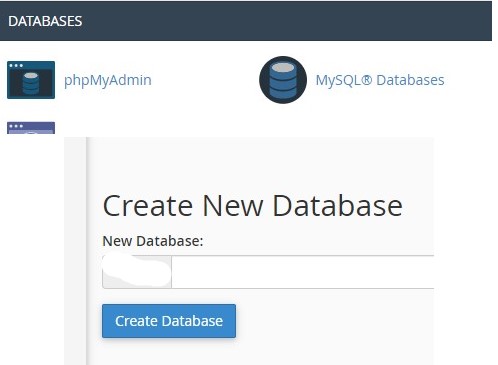
You may be thinking – “I am a web designer, I don’t know how to use MS SQL and SQL Studio.” The good news is that in most cases you don’t need these to design a database for your RESTful site. When logging into your web host, they should provide a Control Panel for your management and installation of much of the components used on the site. The most popular control panels are cPanel and Plesk, today we will be starting in cPanel to move into phpMyAdmin and work on our database. Your first step will be to create the new database using the tools available in cPanel. In the Databases section, click on MySQL Databases and Create New Database. It will fill in the name prefix for you, type…

Read More
Building Your PHP Rest Service (step 6)

Building Your PHP Rest Service (step 6)

PHP, REST
In the article for step 5, we began to get into the main functions of this read-only REST service. We now know how to gather unique counties and regions from our database, and will now retrieve the data based on region/county selections or partial name entered, We are still working in the wineries folder and will show complete code for wineries_by_region.php and then review the slight code modifications made to wineries_by_county.php and wineries_by_name.php <?php // required headers header("Access-Control-Allow-Origin: *"); header("Access-Control-Allow-Headers: access"); header("Access-Control-Allow-Methods: GET"); header("Access-Control-Allow-Credentials: true"); header('Content-Type: application/json'); // include database and object files include_once '../config/database.php'; include_once '../objects/wineries.php'; $cred = 0; $user = $_SERVER['PHP_AUTH_USER']; $pwd = $_SERVER['PHP_AUTH_PW']; if(sha1('* user *') == $user and sha1('* pwd *') == $pwd) $cred = 1; if($cred == 0) { // set response code - 403 Not…
Read More
Building Your PHP Rest Service (step 5)

Building Your PHP Rest Service (step 5)

PHP, REST
In the article for step 4, we looked at the contents of the trivia folder and the PHP code designed to retrieve the question/hint/answer for the id being fed in as a parameter. Over the next two steps we will be getting into the main functionality of this REST service – looking up details for wineries, distilleries and meaderies. Let’s jump right in … We will be looking at the files and procedures created to read counties and regions. The main SQL clause used in the two functions called by these procedures is DISTINCT. The code shown below is for read_counties.php <?php // required headers header("Access-Control-Allow-Origin: *"); header("Access-Control-Allow-Headers: access"); header("Access-Control-Allow-Methods: GET"); header("Access-Control-Allow-Credentials: true"); header('Content-Type: application/json'); // include database and object files include_once '../config/database.php'; include_once '../objects/wineries.php'; $cred = 0; $user =…
Read More
Building Your PHP Rest Service (step 4)

Building Your PHP Rest Service (step 4)

PHP, REST
In the article for step 3, we looked at the shared directory and the getPaging function. Although these are not used in our final solution – Wet Ur Whis(tel), we have gained the experience of creating shared functions. Next we will cover the trivia folder and the PHP code used to load a trivia question, hint and answer using ID as the parameter. In the trivia folder we have one file called questions_by_id.php. The code which loads question data is shown below. <?php // required headers header("Access-Control-Allow-Origin: *"); header("Access-Control-Allow-Headers: access"); header("Access-Control-Allow-Methods: GET"); header("Access-Control-Allow-Credentials: true"); header('Content-Type: application/json'); // include database and object files include_once '../config/database.php'; include_once '../objects/trivia.php'; $cred = 0; $user = $_SERVER['PHP_AUTH_USER']; $pwd = $_SERVER['PHP_AUTH_PW']; if(sha1('* encrypted user name goes here *') == $user and sha1('* encrypted password goes here…
Read More
Building Your PHP Rest Service (step 3)

Building Your PHP Rest Service (step 3)

PHP, REST
In the article for step 2, we continued building building our Representational State Transfer (REST) service by looking at files located in the objects directory. Next, we will look at the shared directory. Our final project, located at https://winehopper.app does not use this directory. Shared will contain a file such as utilities.php which contains a getPaging function which is shared among all WordPress PHP theme pages. That function is shown below. <?php class Utilities{ public function getPaging($page, $total_rows, $records_per_page, $page_url){ // paging array $paging_arr=array(); // button for first page $paging_arr["first"] = $page>1 ? "{$page_url}page=1" : ""; // count all products in the database to calculate total pages $total_pages = ceil($total_rows / $records_per_page); // range of links to show $range = 2; // display links to 'range of pages' around 'current…
Read More
Building Your PHP Rest Service (step 2)

Building Your PHP Rest Service (step 2)

PHP, REST
In the article for step 1, we set up the directory structure and covered the config directory. Using standard top-down approach, we are moving on to the objects directory today. In this REST service, we have a list of wineries, their online listings and a trivia page. This means we need three object files inside of the directory – online.php, trivia.php and wineries.php. The code shown below is for online.php. <?php class Online{ // database connection and table name private $conn; private $table_name = "Online"; // object properties public $id; public $description; public $url; public $recid; // constructor with $db as database connection public function __construct($db){ $this->conn = $db; } function reviewsById($id){ // select reviews for winery $query = "SELECT id,description,url,recid FROM " . $this->table_name . " where id = ?…
Read More
Building Your PHP Rest Service (step 1)

Building Your PHP Rest Service (step 1)

Featured, PHP, REST
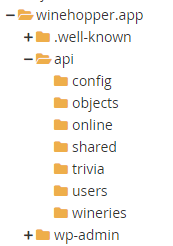
he first thing to do is create the directory structure. For our Representational State Transfer (REST) Read services we are using the directory structure shown below from our WordPress site File Viewer The basic file called core.php goes into our config directory. Code for that file is: <?php // show error reporting ini_set('display_errors', 1); error_reporting(E_ALL); // home page url $home_url="http://localhost/api/"; // page given in URL parameter, default page is one $page = isset($_GET['page']) ? $_GET['page'] : 1; // set number of records per page $records_per_page = 5; // calculate for the query LIMIT clause $from_record_num = ($records_per_page * $page) - $records_per_page; ?> In that same Config directory, we have a file called database.php. The code in that file is: <?php class Database{ // specify your own database credentials private $host…
Read More