
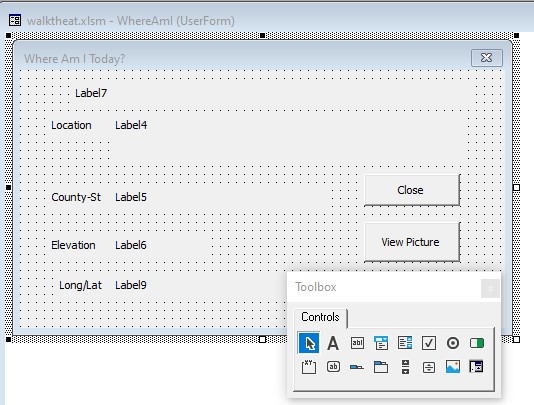
Appalachian Trail Userform-VBA Creation
We will start by showing you the first snippet of VBA code and proceed with an explanation. Sub novloc() Dim offnbr, offnbr2 As Variant currow = ActiveCell.Row nbr = Range("AG" & currow).Value Sheets(3).Activate offnbr = Application.Match(nbr, Range("a5:a1515"), 1) Range("a5").Offset(offnbr, 0).Activate WhereAmI.Label4.Caption = ActiveCell.Offset(0, 1).Value ctyst = ActiveCell.Offset(0, 4).Value + " - " WhereAmI.Label6.Caption = ActiveCell.Offset(0, 2).Value Sheets(4).Activate offnbr2 = Application.Match(nbr, Range("a2:a292"), 1) Range("a2").Offset(offnbr2, 0).Activate WhereAmI.Label5.Caption = ctyst + ActiveCell.Offset(0, 5).Value WhereAmI.Label9.Caption = Str(ActiveCell.Offset(0, 6).Value) + " /" + Str(ActiveCell.Offset(0, 7).Value) Sheets(3).Activate 'If ActiveCell.Offset(0, 1).Hyperlinks(1).Address <> "" Then If ActiveCell.Offset(0, 1).Hyperlinks.Count > 0 Then WhereAmI.Label7.Caption = ActiveCell.Offset(0, 1).Hyperlinks(1).Address WhereAmI.CommandButton2.Visible = True End If Sheets(1).Activate WhereAmI.Show End Sub You should have downloaded walktheat.xlsm and explored the usage of the “Location” and “LongLat” sheets. We have two other sheets named “Log2021” and “Log2022” which have…
