
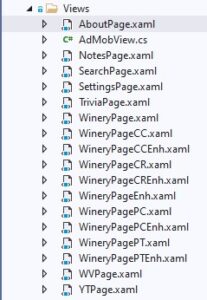
Xamarin Cross-Platform Solution Creating the Views Directory (AdMobView-NotesPage)

Xamarin Cross-Platform Solution Creating the Views Directory (AdMobView-NotesPage)

C#, MySQL, Xamarin Forms
In this post, we will take a look at the AdMobView.cs and NotesPage used in our WetYourWhistle mobile app. Why do we have a routine called AdMobView and why have you seen references to AdMob so far? Because everyone deserves to make a dollar or two from all of their programming efforts. AdMob is one of the ways to monetize your mobile app, creating income from ads placed in inconspicuous places. The code shown below is included in our AdMobView.cs class. What is it doing? I am glad that you were wondering that. This public class inherits main functionality from, or is built upon, the standard View class. As illustrated, it is only creating two properties - AdUnitIdProperty and AdUnitId which allow posting of ad revenue to our AdMob account.…
Read More
Xamarin Cross-Platform Solution Creating the Views Directory (AboutPage)

Xamarin Cross-Platform Solution Creating the Views Directory (AboutPage)

C#, Programming, Xamarin Forms
Now we get to create the individual Views used in our Xamarin cross-platform mobile app. Because many of these are quite similar, we will be excluding much of the code in XAML page documents below the first. As I am sure you already know, proper app design means separation of the Model-View-Controller into their own sections of code. Today we will be covering the View designs of our Wet Your Whistle mobile app. We will start below with the xaml contained in the About page. <?xml version="1.0" encoding="utf-8" ?> <ContentPage xmlns="http://xamarin.com/schemas/2014/forms" xmlns:x="http://schemas.microsoft.com/winfx/2009/xaml" xmlns:local="clr-namespace:NYWineryHopper.Views" xmlns:controls="clr-namespace:MarcTron.Plugin.Controls;assembly=Plugin.MtAdmob" x:Class="NYWineryHopper.Views.AboutPage" Title="About"> <ContentPage.ToolbarItems > <ToolbarItem Text="Vid Walkthru" Clicked="Loadvid" /> <ToolbarItem Text="Settings" Clicked="LoadSettings" /> </ContentPage.ToolbarItems> <ContentPage.Content> <Grid> <Grid.RowDefinitions> <RowDefinition Height="*" /> <RowDefinition Height="50" /> </Grid.RowDefinitions> <StackLayout Grid.Row="0"> <Label Text="About NY Wine Hopper" FontSize="Large" VerticalOptions="CenterAndExpand" HorizontalOptions="CenterAndExpand" /> <Image…
Read More
Xamarin Cross-Platform Solution Creating the Data Directory

Xamarin Cross-Platform Solution Creating the Data Directory

C#, Programming, Xamarin Forms
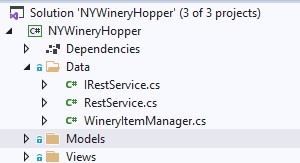
Now we will be able to make the connection between the MySQL database designed previously and the individual models. This connection is enabled using the interface, service and Item Manager files shown at the left. Let's begin by explaining the interface and service together. public interface IRestService { Task<List<WineryItem>> ReadWineries(string typ, string val, int wrs, int distanceFrom); Task<List<string>> GetLTDNames(); Task<List<string>> GetCounties(); Task<string> GetName(int id); Task<double> GetLat(int id); Task<double> GetLong(int id); } As with the other interface we have seen, this class file defines the individual procedures declared inside of RestService. After the task declaration we define what will be returned by the individual process (List of WineryItem, list of strings, string, double). Inside the parentheses of each procedure you will notice the type and name of parameters being fed into…
Read More